What we found, and where it could go.
A quick, independent look at the current BTC Health website: how it is built, how it performs on phones and desktops, and what is holding it back in Google. At the bottom are two concept directions for a refreshed homepage, built to show how quickly we can move.
The short version
The site has solid content and the basics are in place, but it is heavy, slow on mobile and starting to look dated. On a typical phone the homepage takes over 7 seconds to show its main content, and the cookie banner covers almost half the screen on arrival. Product pages shift around as they load, which Google penalises. None of this is hard to fix, and a rebuild would solve most of it in one go.
What it is built on
- WordPress with the Elementor page builder (plus Elementor Pro), on the Hello Elementor theme.
- WooCommerce is installed and used as the product catalogue (27 product pages).
- Rank Math for SEO, WP Rocket for caching, an image optimiser, CookieYes for the cookie banner, and a custom share price plugin.
- Hosted on a LiteSpeed server behind Cloudflare. The footer credits the original build to Media Rocket, dated 2023.
It is a common setup and perfectly workable, but page builders like Elementor generate a lot of extra code. The homepage loads 46 separate scripts and the main menu is written into the page about six times over, which is a big part of why phones struggle with it.
On mobile
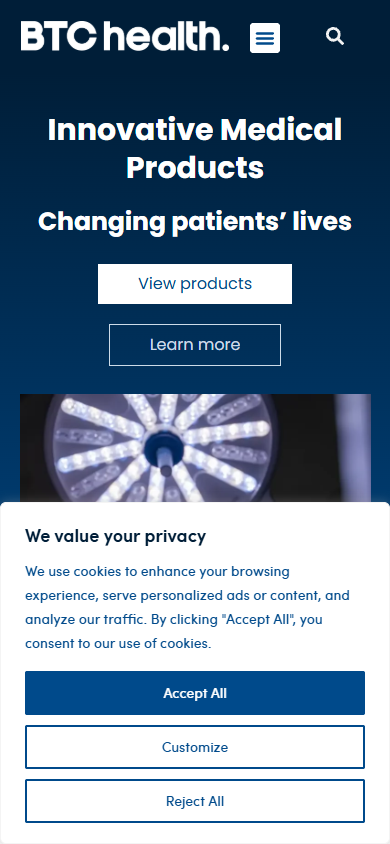
The good news: nothing breaks outright. There is no sideways scrolling and text is readable. The issues are about first impressions and ease of use.
- The cookie banner covers about 40% of the first screen on every page, so the first thing a visitor sees is a privacy notice rather than BTC Health.
- The hero is text and buttons only; the image sits below the fold and is cropped.
- Most buttons and links are smaller than the recommended tap size (39 of 54 on the homepage), including the menu button and the submenu arrows.
- Product spec tables are cut off on phones (for example the Elasto-Q order codes), with no hint that they scroll.
- The ASX announcements page is cramped on mobile, with a large empty grey block under the list.
Speed
Tested with Google Lighthouse, the same engine behind Google's PageSpeed scores.
| Page | Device | Speed | Accessibility | SEO | Main content shows | Layout shift |
|---|---|---|---|---|---|---|
| Homepage | Mobile | 29 | 88 | 92 | 7.3s | 0.10 |
| Homepage | Desktop | 44 | 88 | 92 | 2.8s | 0.00 |
| Product (Elasto-Q) | Mobile | 15 | 91 | 100 | 5.9s | 0.39 |
| Product (Elasto-Q) | Desktop | 44 | 91 | 100 | 4.2s | 0.18 |
The biggest drag is the amount of code the phone has to process before the page becomes usable (over 6 seconds of blocking time on mobile). Product pages also jump around while images load, which is frustrating for visitors and counts against the site in Google.
Google and SEO
The foundations are fine: every key page has a title and description, the sitemap and robots file are set up correctly, and none of the 53 homepage links are broken. The opportunities are in the detail.
- Around 800 thin pages. Most of the 811 posts are ASX announcements and reports with 20 to 30 words each. Some have descriptions that are just a file code. These dilute the site in Google's eyes.
- Thin product pages. Several product pages have only 100 to 300 words, which is not much for Google to rank on. One (IZI) goes the other way, with over 900 images on a single page.
- Missing image descriptions. Most images have no alt text (for example 45 of 48 on the About page), which hurts both accessibility and image search.
- Small technical tidy ups: product pages have two main headings, the site tells Google it is American (en_US rather than en_AU), several pages have no share image, a duplicate product page exists (carbomedics and carbomedics-2), and About and Contact are marked up as blog articles.
- Consistency: "BTC Health" and "BTC health" are used interchangeably, and the footer still says 2023.
- No Google Analytics tag was found on the homepage, so it may be hard to see how the site is actually performing today.
Top fixes, in order
- Lighten the pages for mobile. Cut the script load and repeated menus. This is the single biggest lift for speed and Google.
- Stop product pages jumping as they load by reserving space for images and galleries.
- Swap the cookie banner for a slim bar so the brand is the first thing people see.
- Make product tables work on phones by stacking them neatly.
- Rework the products page so each tile has a name, consistent images, and no placeholder logos.
- Add image descriptions, fix headings and link labels across the site.
- Strengthen thin product pages and tidy or hide the hundreds of thin announcement posts.
- Housekeeping: Australian locale, consistent naming, current footer year, share images and analytics.
Two directions for a fresh homepage
No brief, no back and forth, just the existing copy and a couple of hours. Both are fully responsive and use the real content from the current site. They are starting points, and we can take it in any direction from here.
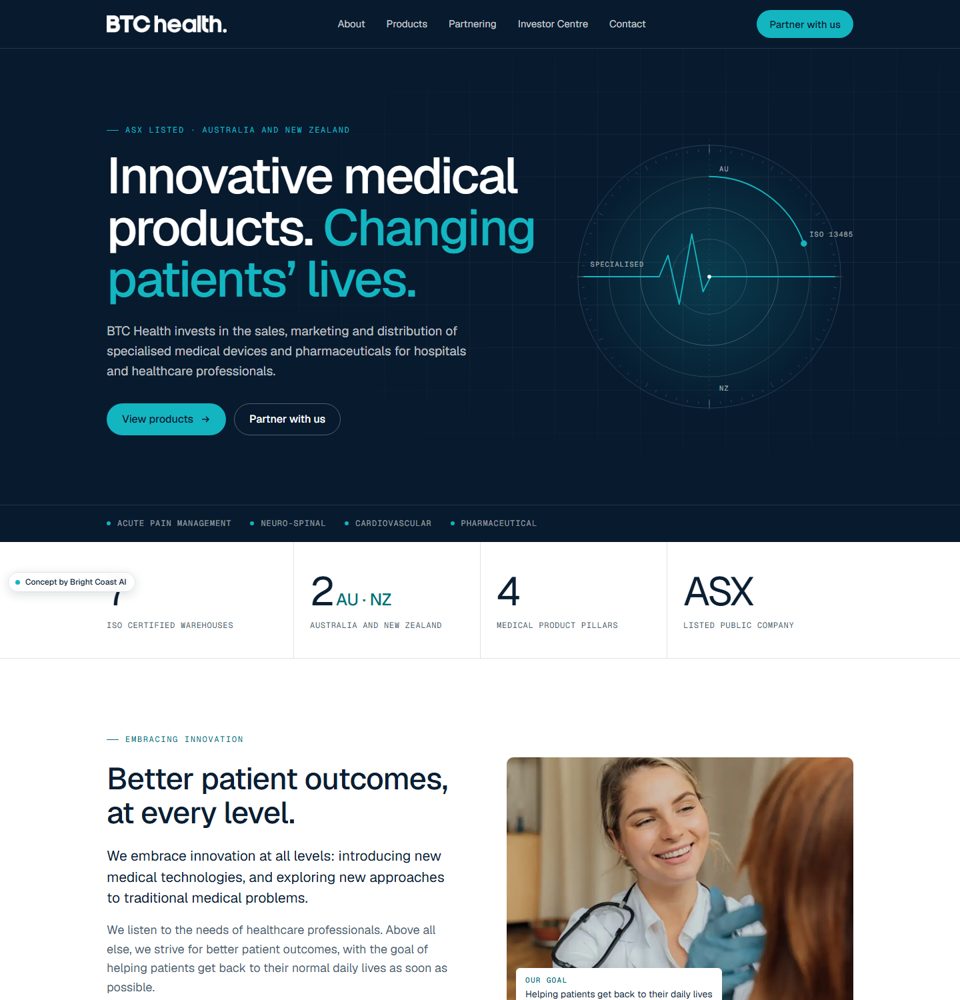
Clinical precision
Deep navy with a clinical cyan accent. Confident, quiet and investor ready, with a clear path for overseas manufacturers looking to partner.
View concept A →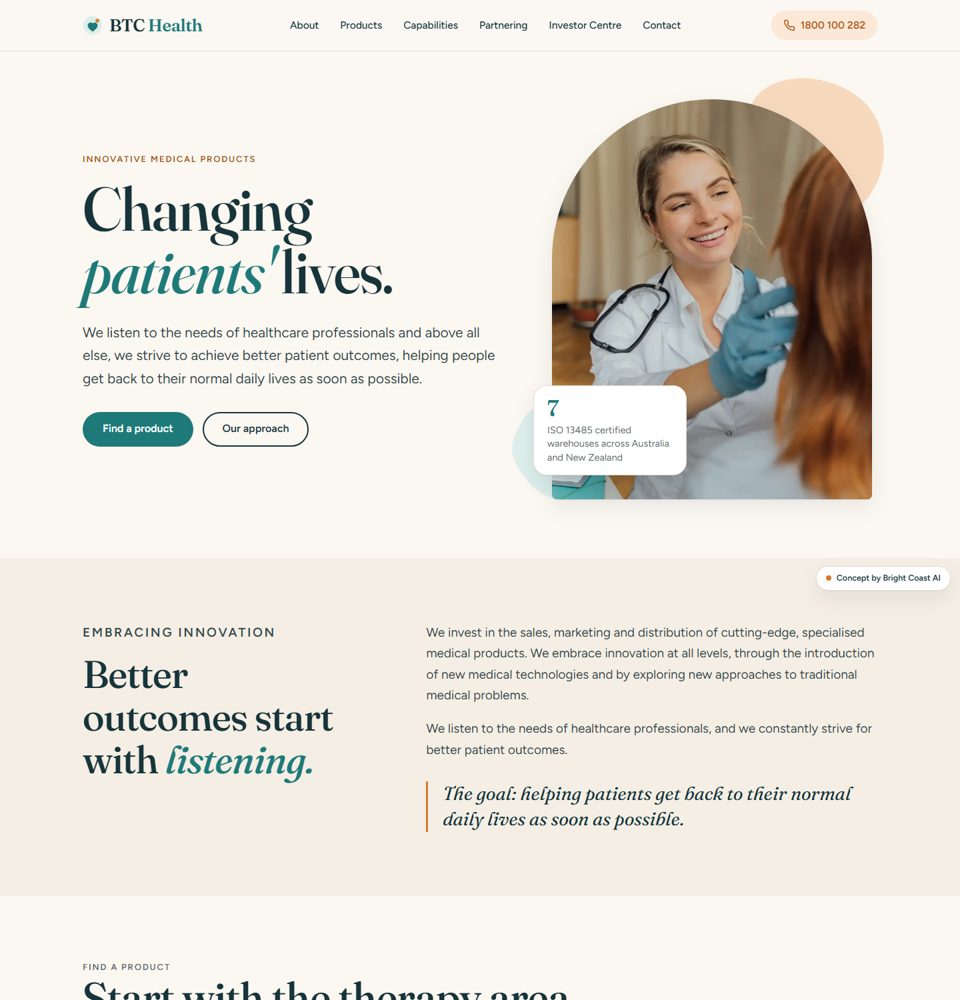
Human outcomes
Warmer and more editorial, led by "Changing patients' lives", with a product finder by therapy area and the helpline front and centre.
View concept B →